Small Steps VII — Share Your Program
Publish Your Program
Build a folder your friends can run.
Make a program to share
void small_main()
{
    print("Hello, friend!");
    input("Press Enter to close.");
}
Choose Try This Code, save it as MyGreeting.cpp, and press Run. The last input waits for Enter so you can read the message. A published console program closes when it finishes; the IDE's automatic exit pause is not included.
Make the Windows folder
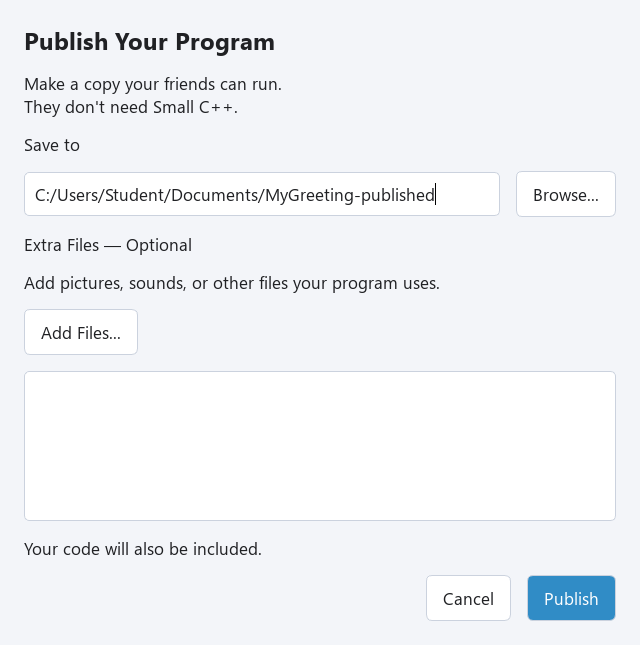
1. Choose File → Publish…. The Publish Your Program window opens. 2. Under Save to, use Browse… to choose where to put the new folder. Choose a folder name that does not exist yet, such as MyGreeting-Published. 3. Leave Extra Files — Optional empty for this program and press Publish. 4. When Your program is ready! appears, choose Open Folder. 5. Double-click MyGreeting.exe, read the greeting, then press Enter.
Publish makes a local Windows x64 copy. It does not upload your work to the Internet. Your friends do not need Small C++, Qt, or a compiler installed. The folder also includes your source code, so they can read how you made it.
Exercise — Your own greeting
Change the greeting to a message for your friend. Save the program as MyGreeting.cpp and publish to a new folder. Run the new MyGreeting.exe and check your message.
void small_main()
{
    print("Hello, friend!");
    input("Press Enter to close.");
}
Hint
Change the text inside print's quotes. Keep input at the end. Each Publish needs a new destination folder; existing folders are not overwritten.
show solution
void small_main()
{
    print("I made this program for you!");
    input("Press Enter to close.");
}