Small Steps VIII — Build with Several Files
Start a Folder Project
Start a Folder Project
Explore one topic in small steps. Try the examples one at a time and take a break whenever you need. Choose how many extra exercises you want to try.
A Folder Is a Project
When your code gets longer
Keep using one file while it is enough. Use a project when you want to separate functions by their jobs. One folder is one project.
Make your first project
1. Choose File → New Project…. 2. Choose where to put it and enter Greeting as its name. 3. Replace the generated main.cpp with the code below and save it.
void small_main()
{
    print("Hello, project!");
}
Choose Run Project. You will see Hello, project!. The name below PROJECT is the folder name. The window title and status bar also identify your project.
For an existing folder, choose File → Open Project (Folder)…, enter that folder, then choose Open This Folder. You do not need a small.project file.
A tab and a project are different
A tab is the file you are reading or editing. Run Project uses all included .cpp files together, regardless of the selected tab. Closing a tab keeps its file in the project. A file from another folder has [Outside Project] on its tab and is not used when running the project.
File → Close Project closes the project without deleting its files.
Find the actual folder
Right-click the project name or a blank area in its file list and choose Show Project in File Explorer. This opens the project folder. Right-click a file or its tab and choose Show in File Explorer to see that file selected. This action is unavailable for files you have not saved yet.
Give Each File a Job
Separate the score calculation
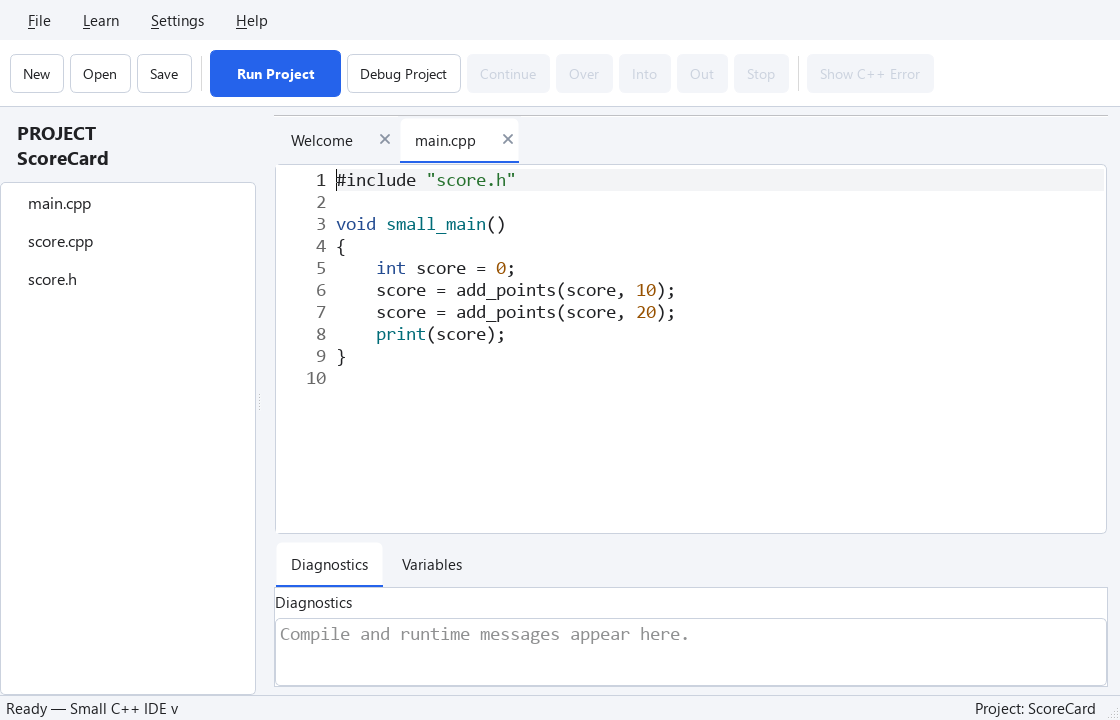
Name files after their jobs. Create a new ScoreCard project. Keep main.cpp, score.h, and score.cpp in the same folder and replace their contents as follows.
score.h
#pragma once

int add_points(int score, int points);
score.cpp
#include "score.h"

int add_points(int score, int points)
{
    return score + points;
}
main.cpp
#include "score.h"

void small_main()
{
    int score = 0;
    score = add_points(score, 10);
    score = add_points(score, 20);
    print(score);
}
Run Project prints 30. main.cpp controls the program's flow; score.cpp handles the calculation. The score is a local variable in main. Passing values in and returning a new value avoids a shared global variable.
Start with a header named after its source file. Put function declarations in the header and definitions in the source. You do not need a separate file for every small function.
Check the behavior in one file
int add_points(int score, int points)
{
    return score + points;
}

void small_main()
{
    int score = 0;
    score = add_points(score, 10);
    score = add_points(score, 20);
    print(score);
}
Exercise — Check it yourself
Change the message and save. Close the project, reopen the same folder, and run it.
void small_main()
{
    print("Hello, project!");
}
Hint
Use the menus described above. The solution below is for the one-file practice. Apply the same change to the file with that job in your project.
show solution
void small_main()
{
    print("Welcome back!");
}
Try More (Optional)
Exercise — Check it yourself
Add another call worth 5 points to print 35 in the one-file practice. Then add the same call to main.cpp in your project. Do score.h and score.cpp need to change?
int add_points(int score, int points)
{
    return score + points;
}

void small_main()
{
    int score = 0;
    score = add_points(score, 10);
    score = add_points(score, 20);
    print(score);
}
Hint
Use the menus described above. The solution below is for the one-file practice. Apply the same change to the file with that job in your project.
show solution
int add_points(int score, int points)
{
    return score + points;
}

void small_main()
{
    int score = 0;
    score = add_points(score, 10);
    score = add_points(score, 20);
    score = add_points(score, 5);
    print(score);
}